
Home Integration Guide · Updated October 2026
EcoFlow Smart Home Panel 2 vs Jackery Smart Transfer Switch vs Anker Home Power Panel
The EcoFlow Smart Home Panel 2 is a 12-circuit smart sub-panel that switches your home’s essential circuits to an EcoFlow DELTA Pro 3 or DELTA Pro Ultra in about 20 ms. It is the most capable of the three brand-matched panels, but it works only with EcoFlow batteries. The rule is simple: your power station picks the panel. Jackery’s Smart Transfer Switch fits only the Explorer 5000 Plus, and Anker’s Home Power Panel fits only the F3800 and F3800 Plus. All three need a licensed electrician and, in most areas, a permit.
As an Amazon Associate, SolarGenAdvisor earns from qualifying purchases made through links on this page, at no additional cost to you. Ratings are AI-synthesized from manufacturer specs, published figures and logged Amazon prices; we did not install or test these panels.
 By Morgan Chen
Reviewed & approved by Juhi Sahni
|
Published: 2026-10-31
|
Updated:
|
Transfer Switch Guide
Quick Verdict: Which Smart Home Panel Should You Buy?
None of these panels works across brands, so start with the station you own or plan to buy:
- EcoFlow DELTA Pro 3 or DELTA Pro Ultra: EcoFlow Smart Home Panel 2 (12 circuits, about 20 ms, up to three inverters).
- Jackery Explorer 5000 Plus: Jackery Smart Transfer Switch (12 circuits at 120V or 6 at 240V, 20 ms or less).
- Anker SOLIX F3800 or F3800 Plus: Anker Home Power Panel (12-circuit load center, 12 kW continuous), currently unavailable on Amazon.
- Bluetti Apex 300: Bluetti’s AT1 Smart Distribution Panel, sold by Bluetti.
- Jackery HomePower 3600 Plus or 3000, or any 120V-only station: no smart panel exists; use a manual transfer switch or an interlock kit (see our transfer switch guide).
What Is a Smart Home Panel (and How Is It Different From a Transfer Switch)?
A smart home panel is a brand-matched automatic transfer switch with a computer inside. It sits beside your main breaker panel and feeds a set of backed-up circuits. When the grid drops, it isolates your home from the utility and switches those circuits to the battery on its own, then lets you watch and control each circuit from the brand’s app. A manual transfer switch does the same isolation job, but someone has to go and throw the switches. An interlock kit is a mechanical slide plate on the main panel that stops the main breaker and a generator breaker from being on together.
| Smart home panel | Manual transfer switch | Interlock kit + inlet | |
|---|---|---|---|
| Switchover | Automatic, about 20 ms on all three here | Manual, by hand | Manual, by hand |
| Works with | One brand’s specific stations | Any station with a matching outlet | Any station with a matching outlet |
| Circuits | 12 on each panel here | Fixed set, commonly 6–10 | Whole panel, you manage the load |
| App and load control | Yes: per-circuit control, backup reserve, time-of-use | No | No |
| Protects you when away | Yes | No | No |
We cover manual switches, generator cords and inlet boxes in depth, including which one suits a 120V-only station, in our transfer switch for a solar generator guide, and panel-specific kits by brand in our generator interlock kit guide. For the head-to-head, see interlock kit vs transfer switch. This page covers only the smart, brand-matched panels.
Compatibility Matrix: Which Power Station Works With Which Panel?
This is the table that saves money. Every pairing below comes from the manufacturer or a named retailer listing. If your station isn’t listed, assume no smart panel supports it and confirm with the maker before you buy.
| Power station | Smart panel that fits | Works? | Max setup | Source |
|---|---|---|---|---|
| EcoFlow DELTA Pro Ultra | Smart Home Panel 2 | ✓ Yes | Up to 3 inverters, 90 kWh, 21.6 kW | EcoFlow page and Amazon listing |
| EcoFlow DELTA Pro 3 | Smart Home Panel 2 | ✓ Yes | Up to 3 units + 6 extra batteries, 36 kWh | EcoFlow Amazon listing; Smart Home Explorer |
| EcoFlow DELTA Pro (original) | Smart Home Panel 2 | Conditional | Two units plus EcoFlow’s Double Voltage Hub (7,200W) | Outbound Power says a single DELTA Pro only charges through SHP2 and does not discharge |
| Jackery Explorer 5000 Plus | Smart Transfer Switch | ✓ Yes | Up to 2 units, 14,400W, 60 kWh | Jackery listing (“Compatible with 5000 Plus”) |
| Jackery HomePower 3600 Plus | Manual transfer switch only | ✗ No smart panel | — | Jackery’s launch release names a Manual Transfer Switch for it (pv magazine) |
| Jackery HomePower 3000 | Manual transfer switch only | ✗ No smart panel | — | Jackery lists six circuits via its manual switch |
| Anker SOLIX F3800 Plus | Home Power Panel | ✓ Yes | Up to 2 units, 12,000W | Anker F3800 Plus kit page; Amazon bundle listing |
| Anker SOLIX F3800 | Home Power Panel | ✓ Yes | Up to 2 units | Anker owner manual |
| Bluetti Apex 300 | Bluetti AT1 Smart Distribution Panel | ✓ Yes | Up to 3 units via Hub A1 | Bluetti AT1 page (sold by Bluetti; no Amazon listing found) |
Sources: EcoFlow SHP2 page; Outbound Power SHP2 listing; Jackery; Jackery HomePower 3600 Plus launch release (pv magazine); Anker owner manual; Anker F3800 Plus kit; Bluetti AT1. Amazon listings checked November 1, 2026.
Watch for these traps: the HomePower 3600 Plus is Jackery’s home-backup model, but its home connection is a manual transfer switch, not the Smart Transfer Switch. And EcoFlow’s first-generation Smart Home Panel is a different product from Smart Home Panel 2. Amazon lists some DELTA Pro Ultra bundles with each, so check the “2” in the title.
How We Score Smart Home Panels
A panel stores no energy, so our power-station awards matrix doesn’t fit. These ratings use a separate home-panel rubric on the same 0–100 scale. Scores are AI-synthesized from manufacturer spec sheets and manuals, retailer spec tables and Amazon prices and availability checked on November 1, 2026. We did not install or test these panels, and we don’t use Amazon star ratings, because we have no reliable review data for these listings. A feature the maker doesn’t publish earns no credit. Panel scores can’t be compared directly with power-station scores.
- Circuits & capacity (25%): backed-up circuits (all three cover 12) averaged with maximum continuous backup power, scaled to the 21.6 kW of three DELTA Pro Ultra inverters.
- Switchover & automation (20%): a published 20 ms transfer, plus documented per-circuit app control and automatic priority tiers.
- Ecosystem & scalability (20%): maximum supported battery capacity in kWh, scaled to the largest (90 kWh).
- Energy management (15%): credit for each documented mode: backup reserve, time-of-use, storm prep, generator input and solar self-consumption.
- Install flexibility (10%): outdoor-rated enclosure scores highest, indoor-only lowest.
- Value & availability (10%): the lowest in-stock price divided by this panel’s price; a panel Amazon lists as unavailable scores zero here.
The 3 Smart Home Panels, Reviewed
Best for EcoFlow DELTA Pro 3 and DELTA Pro Ultra

EcoFlow Smart Home Panel 2
12 circuits · ~20 ms switchover · 120/240V · 3 DELTA Pro Ultra inverters or 3 DELTA Pro 3 · Our score 82/100
Price: $1,899.00
EcoFlow’s Smart Home Panel 2 (SHP2) is a 12-circuit sub-panel with an automatic switch to battery in about 20 ms. It takes up to three DELTA Pro Ultra inverters, or up to three DELTA Pro 3 units with six extra batteries for 36 kWh (EcoFlow’s Amazon listing; EcoFlow). It does the most of the three: Backup Reserve, Self-Power, scheduled tasks and time-of-use modes in the EcoFlow app, three circuit-priority tiers, and a 3–12 kW gas generator as a second backup source. Retailer spec tables list 60A at 120/240V (Smart Home Explorer; Outbound Power). EcoFlow rates the distribution panel NEMA 3R, so it can go outdoors, but the separate battery connection box is NEMA 1, so that box stays indoors. A few bundle listings say 10 circuits. We use EcoFlow’s own figure of 12.
Pros
- + Works with both current EcoFlow home systems (DPU and DELTA Pro 3)
- + Scales furthest: three inverters, up to 90 kWh with the DPU
- + Most energy-management modes, plus gas-generator input
Cons
- − The most expensive panel here, before installation
- − EcoFlow batteries only: no other brand’s station works with it
- − Battery connection box must be mounted indoors
Buy it if: Owners of a DELTA Pro 3 or DELTA Pro Ultra who want hands-off, automatic backup of up to 12 circuits. Skip it if: Anyone without an EcoFlow DELTA-class station, or anyone happy to flip a manual switch when the power goes out.
Best Value: Jackery Explorer 5000 Plus

Jackery Smart Transfer Switch
12 circuits · ~20 ms switchover · 120/240V · 2 Explorer 5000 Plus · Our score 66/100
Price: $999.00
Jackery’s Smart Transfer Switch is the automatic option for the Explorer 5000 Plus, and only for that series. Jackery lists it as “Compatible with 5000 Plus” (Jackery). It covers 12 circuits at 120V or 6 at 240V and switches in 20 ms or less. With two 5000 Plus units it reaches 14,400W and 60 kWh (Jackery’s Amazon listing). Outbound Power’s spec table lists 100A grid and 60A power-station inputs, a 60A home-load output, Wi-Fi and Bluetooth, about 25.6 lb, and a NEMA Type 1 enclosure, which is an indoor rating (Outbound Power). In the Jackery app you can switch individual circuits and run a peak/off-peak mode that uses battery power when rates are high.
Pros
- + About half the price of the EcoFlow panel, and in stock from Jackery
- + Pairs two 5000 Plus units for 14,400W of 120/240V output
- + App control of each circuit
Cons
- − 5000 Plus series only: not the HomePower 3600 Plus or 3000
- − Indoor (NEMA Type 1) enclosure
- − Jackery’s listing doesn’t mention gas-generator input
Buy it if: Explorer 5000 Plus owners who want automatic backup of essential circuits for the least money. Skip it if: HomePower 3600 Plus or 3000 owners: Jackery pairs those with a manual transfer switch.
Best for Anker SOLIX F3800 / F3800 Plus
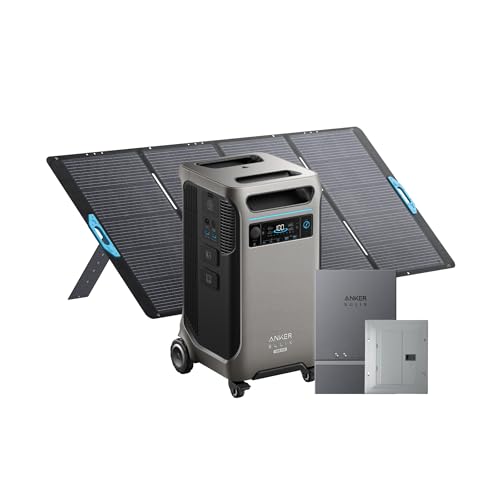
Anker SOLIX Home Power Panel
12 circuits · ~20 ms switchover · 120/240V · 2 F3800 or F3800 Plus · Our score 55/100
Anker’s Home Power Panel (HPP) connects one or two F3800-series stations to your home. Anker’s owner manual lists an optional 12-circuit backup load center, 120/240V, a continuous backup output of 12 kW (50A) and a 75A grid input (Anker owner manual). Anker’s F3800 Plus kit page confirms the F3800 Plus works with it, and its Storm Guard mode, which charges the battery ahead of severe weather, requires the panel (Anker). Retailers list a 20 ms switchover (Best Buy; Adorama). The manual says the panel and its load center install indoors only. When we checked on November 1, 2026, Amazon listed both the panel and the F3800 Plus + panel bundle as currently unavailable.
Pros
- + Highest continuous backup output per panel of the three (12 kW)
- + Self-consumption, peak/valley and Storm Guard modes
- + Covers both the F3800 and the F3800 Plus
Cons
- − Currently unavailable on Amazon
- − Indoor installation only
- − Anker says grid-tied rooftop solar will not charge the station through it during an outage
Buy it if: F3800 or F3800 Plus owners who want automatic, app-managed backup and can buy from Anker directly. Skip it if: Anyone who needs to order on Amazon today, or who wants rooftop solar to recharge the battery during a grid outage.
What about Bluetti?
Bluetti’s equivalent is the AT1 Smart Distribution Panel. Bluetti says it combines grid power, generators, rooftop solar inverters and Bluetti storage, switches to backup automatically, and supports the Apex 300 (up to three units through the Hub A1) as well as the EnergyPro 6K and 13K (Bluetti). Bluetti’s page did not list a circuit count or switchover time, and we found no Amazon listing for the AT1, so we haven’t scored it. The Apex 300 itself is on Amazon; see our Bluetti Apex 300 review.
Smart Home Panel 2 vs Smart Transfer Switch vs Home Power Panel: Specs
| Spec | EcoFlow Smart Home Panel 2 | Jackery Smart Transfer Switch | Anker SOLIX Home Power Panel |
|---|---|---|---|
| Works with | EcoFlow DELTA Pro Ultra, EcoFlow DELTA Pro 3, EcoFlow DELTA Pro (two units + Double Voltage Hub) | Jackery Explorer 5000 Plus | Anker SOLIX F3800, Anker SOLIX F3800 Plus |
| Backed-up circuits | 12 | 12 at 120V or 6 at 240V | 12 (optional load center) |
| Switchover | ~20 ms | ≤20 ms | ~20 ms (retailer listings) |
| Voltage | 120/240V | 120/240V | 120/240V |
| Rated backup current | 60A (retailer spec tables) | 60A home-load output | 50A / 12 kW continuous |
| Max stations | 3 DELTA Pro Ultra inverters or 3 DELTA Pro 3 | 2 Explorer 5000 Plus | 2 F3800 or F3800 Plus |
| Max storage | 90 kWh (DPU); 36 kWh (DELTA Pro 3) | 60 kWh | 53.8 kWh (two F3800 Plus, 12 batteries) |
| Enclosure | Distribution panel NEMA 3R (indoor/outdoor); battery connection box NEMA 1 (indoor) | NEMA Type 1 (indoor), per Outbound Power spec table | Indoor only (panel and 12-circuit backup load center) |
| App modes | Backup Reserve, Self-Power, Scheduled, TOU, storm alert | Circuit control, peak/off-peak | Self-consumption, peak/valley, backup reserve, Storm Guard |
| Gas generator input | Yes, 3–12 kW | Not documented | Not detailed in manual |
| Our score | 82/100 | 66/100 | 55/100 |
| Amazon price | $1,899.00 | $999.00 | Check price at Amazon → |
Sources are linked in each panel card above. Some EcoFlow bundle listings say 10 circuits; EcoFlow’s own page says 12. The Anker maximum assumes two F3800 Plus units, each with six expansion batteries, per Anker’s Amazon bundle listing.
Circuits, 120/240V and Switchover Time Explained
12 circuits is not a whole house
Each panel backs up a chosen set of branch circuits, not every breaker in your home. A 240V circuit (well pump, electric dryer, some heat pumps) uses two slots, which is why Jackery quotes 12 circuits at 120V but 6 at 240V. Pick circuits by what you need during an outage: fridge, furnace blower, well or sump pump, lights, internet. Then check that their combined running watts stay under your station’s output. Our guide to whether a solar generator can power a house walks through that budget.
120/240V needs a 240V-capable station
All three panels are 120/240V split-phase, and each brand pairs them with stations that output 240V: the DELTA Pro 3 and DPU, the Explorer 5000 Plus, and the F3800 series. The panel can’t create 240V from a 120V-only station, which is one reason the HomePower 3600 Plus (120V) gets a manual switch instead.
What 20 ms switchover means
At 60 Hz, one AC cycle lasts about 16.7 ms, so a 20 ms transfer is a gap of roughly 1.2 cycles. The makers describe this as seamless, and fridges, pumps and lighting generally restart without anyone noticing. For a desktop computer or network gear you can’t afford to drop, the safest plan is a dedicated UPS or the station’s own UPS outlet. Our power station vs UPS guide explains the difference.
How Do Smart Home Panels Handle Solar and Grid Charging?
This is where the panels differ most, and where marketing language can mislead.
- EcoFlow SHP2: portable or roof-mounted DC panels plug into the DELTA Pro 3 or DPU’s own solar inputs, not into the panel. EcoFlow’s FAQ says rooftop PV should not be wired directly to SHP2, but existing AC-coupled solar systems are compatible. Its time-of-use and Self-Power modes manage when the batteries charge and discharge around your utility rates (EcoFlow).
- Jackery Smart Transfer Switch: its charge-discharge mode uses stored power during peak-rate hours and goes back to grid power when rates drop (Outbound Power). Solar goes into the Explorer 5000 Plus’s own inputs. Jackery’s listing doesn’t describe how existing rooftop PV behaves during an outage, so ask Jackery or your installer before counting on it.
- Anker Home Power Panel: in self-consumption mode, a current clamp on your PV circuit lets surplus rooftop solar charge the F3800 while the grid is up (Anker owner manual). But Anker states that a grid-tie solar array will not charge the F3800 through the panel when the grid is down, because grid-tie inverters must stop exporting during an outage (Anker F3800 home system page). During an outage, recharge from portable panels plugged into the station.
The general rule: a standard grid-tied solar inverter shuts down when the grid fails, for line-worker safety. Plan on DC solar plugged straight into the power station for outage recharging. Our do solar panels work in a power outage guide explains why.
How Long Will a Panel-Connected Station Run Your Circuits?
The panel adds no energy. Runtime is set by the battery behind it. Our formula is battery Wh × 0.85 ÷ average load in watts, where 0.85 allows for inverter losses. Figures are for a single station with no expansion batteries.
| Average load | Bluetti Apex 300 2,765 Wh |
Anker SOLIX F3800 Plus 3,840 Wh |
EcoFlow Delta Pro 3 4,096 Wh |
Jackery Solar Generator 5000 Plus 5,040 Wh |
EcoFlow DELTA Pro Ultra 6,144 Wh |
|---|---|---|---|---|---|
| Fridge, router, LED lights (~300W) | ~7.8 h | ~10.9 h | ~11.6 h | ~14.3 h | ~17.4 h |
| Above + gas furnace blower (~800W) | ~2.9 h | ~4.1 h | ~4.4 h | ~5.4 h | ~6.5 h |
| Above + well or sump pump running (~1,500W) | ~1.6 h | ~2.2 h | ~2.3 h | ~2.9 h | ~3.5 h |
| Above + window AC or microwave in use (~3,000W) | ~0.8 h | ~1.1 h | ~1.2 h | ~1.4 h | ~1.7 h |
| Station price | $3,499.00 | Check price at Amazon → | $2,799.00 | $3,149.00 | Check price at Amazon → |
Loads are averages: a fridge or pump cycles on and off, so its average draw is well below its running watts. The 3,000W row also needs a station whose output covers it; all five here do. For more hours, add expansion batteries or a second station. That is where the panels earn their keep, because SHP2, the Jackery switch and the Anker panel each manage multiple units. Our best whole-home solar generators roundup compares the expandable systems.
Smart Home Panel 2 Installation: Cost, Permits and Safety
All three panels are electrician installs. EcoFlow’s Amazon listing states that Smart Home Panel 2 “must be professionally installed before operation,” and the other two connect to your main service panel in the same way. Connecting any backup source to premises wiring falls under NEC Article 702 (optional standby systems). It requires transfer equipment that keeps the utility and the backup source from ever being connected together (EC&M on Article 702; IAEI Magazine). Battery systems may also bring in Article 706. Your jurisdiction’s adopted code edition and your inspector decide the details, and most areas require a permit. We deliberately give no wiring steps.
Never connect a power station to your home through a dryer or wall outlet with a “suicide cord.” Backfeeding can energize utility lines and endanger line workers and neighbors (CPSC; OSHA). Preventing that is the whole job of these panels.
What installation costs
EcoFlow is the only one of the three that publishes a figure. Its SHP2 page lists an installation service, available only in listed states, with a basic cost of $2,000–$2,500. It covers labor and wiring within 2 feet of the load center, and breakers are not included. EcoFlow also offers a free consultation that connects you with local electricians (EcoFlow). Jackery and Anker don’t publish installation prices on the pages we checked. Your real cost depends on your main panel, the distance to the install spot, permit fees and local labor rates, so get two or three quotes from licensed electricians before you buy.
Power Stations That Pair With a Smart Home Panel
A panel only works with the battery behind it. These are the compatible stations we have already reviewed, with their power-station scores from our awards matrix.

One wheeled 4,096 Wh box with 4,000W of 120/240V output. Add SHP2 for automatic switching, or start with a manual transfer switch and upgrade later.
Price: $2,799.00

Pairs with: Smart Home Panel 2 (included in this bundle)
6,144 Wh · 7,200W · Our score 90/100
This listing bundles the DPU with Smart Home Panel 2: 6,144 Wh and 7,200W at 120/240V, scaling to 90 kWh. Amazon showed no live price when we checked.
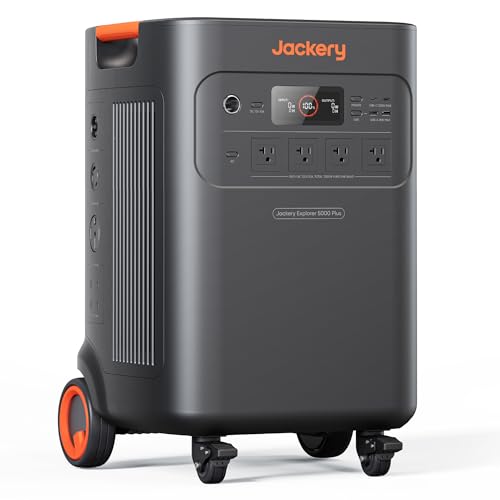
Pairs with: Jackery Smart Transfer Switch
Jackery Solar Generator 5000 Plus
5,040 Wh · 7,200W · Our score 90/100
5,040 Wh and 7,200W at 120/240V, expandable to 60 kWh. It is the only Jackery station the Smart Transfer Switch supports.
Price: $3,149.00

3,840 Wh with 6,000W of 120/240V output and 3,200W of solar input. Anker pairs it with the Home Power Panel or a manual transfer switch.

2,764.8 Wh with 3,840W at 120/240V from one unit. Bluetti’s AT1 panel adds automatic switching for up to three units.
Price: $3,499.00

Pairs with: Manual transfer switch (no smart panel)
3,584 Wh · 3,600W · Our score 89/100
3,584 Wh and 3,600W at 120V. It cannot use Jackery’s Smart Transfer Switch, so plan on a manual switch.
Price: $2,549.00
When we checked on November 1, 2026, the DELTA Pro Ultra bundle, Explorer 5000 Plus, F3800 Plus and HomePower 3600 Plus listings showed no live Amazon price. Their buttons open the Amazon listing so you can check current availability.
Who Should Buy a Smart Home Panel, and Who Should Skip It
Buy one if you…
- + Own (or are buying) a DELTA Pro 3, DELTA Pro Ultra, Explorer 5000 Plus or F3800-series station
- + Travel or work away from home and need backup to start without you, for a sump pump, well pump, freezer or medical device
- + Pay time-of-use rates and want the battery to work every day, not just during outages
- + Plan to add a second station or expansion batteries later
Skip it if you…
- − Rent, or cannot get an electrician and a permit
- − Own a 120V-only or non-matching station: a manual transfer switch or interlock kit is the right tool
- − Are home for most outages and don’t mind flipping switches; a manual switch costs far less
- − Need only a fridge and a few lights; extension cords from the station do that with no install
Still choosing the battery? Start with our home battery backup guide, or compare the EcoFlow Delta Pro 3 and Anker SOLIX F3800 Plus reviews side by side.
Smart Home Panel FAQ
What is the EcoFlow Smart Home Panel 2?
It is a 12-circuit smart sub-panel that connects EcoFlow DELTA Pro 3 or DELTA Pro Ultra batteries to your home and switches the backed-up circuits to battery in about 20 ms when the grid fails. It supports up to three inverters, a 3-12 kW gas generator, and app modes such as Backup Reserve and time-of-use, and it must be installed by a professional.
Does the Smart Home Panel 2 work with the DELTA Pro 3?
Yes. EcoFlow's Amazon listing says Smart Home Panel 2 supports up to three DELTA Pro 3 units with six extra batteries for 36 kWh. It also works with the DELTA Pro Ultra. The original DELTA Pro needs two units and EcoFlow's Double Voltage Hub to discharge through it.
Is a smart home panel better than a transfer switch?
It is more automatic, not safer. Both isolate your home from the grid. A smart panel switches by itself in about 20 ms and adds app control of each circuit, but it works only with one brand's stations and costs more. A manual transfer switch works with any station that has a matching outlet, but someone must be home to switch it.
Does the Jackery Smart Transfer Switch work with the HomePower 3600 Plus?
No. Jackery lists the Smart Transfer Switch as compatible with the Explorer 5000 Plus series, and Jackery's launch announcement for the HomePower 3600 Plus describes connecting it to a home through a manual transfer switch.
Does the Anker Home Power Panel work with the F3800 Plus?
Yes. Anker sells the F3800 Plus with the Home Power Panel and says its Storm Guard mode requires the panel. The panel connects one or two F3800 or F3800 Plus stations. When we checked, Amazon listed the panel as currently unavailable.
How much does it cost to install the Smart Home Panel 2?
EcoFlow lists an installation service in selected states with a basic cost of $2,000 to $2,500, covering labor and wiring within 2 feet of the load center but not breakers. Your actual cost depends on your main panel, permit fees and local labor rates, so get quotes from licensed electricians.
Can I install a smart home panel myself?
No. These panels connect to your main service panel, which is licensed-electrician work in most areas and usually needs a permit. Backup connections fall under NEC Article 702, and EcoFlow states that Smart Home Panel 2 must be professionally installed.
Will a smart home panel power my whole house?
Usually not. Each panel here backs up a set of 12 circuits, or 6 at 240V on the Jackery switch, and the power station's output limits what can run at once. Central air, an electric range and an electric water heater together typically exceed a single station.
Ready to plan your setup?
Match the panel to your station using the compatibility table, list the circuits you need, and get an electrician’s quote. Then check current prices.