
Comparison Guide · Updated October 2026
Power Station vs UPS: Which Backup Belongs Under Your Desk?
A traditional UPS gives your computer a few minutes to shut down gracefully. A power station with UPS mode keeps the whole desk working — for hours. The difference comes down to one number (switchover speed, measured in milliseconds) and one trade-off (runtime per dollar). This guide explains both honestly, including where a dedicated UPS is still the right answer, and covers the four power stations whose UPS modes we recommend for home offices and work-from-home setups.
As an Amazon Associate, SolarGenAdvisor earns from qualifying purchases made through links on this page, at no additional cost to you.
 By
By The Head-to-Head
| Factor | Dedicated UPS | Power Station (UPS Mode) |
|---|---|---|
| Switchover speed | 0–10 ms (online/line-interactive) | Typically 10–30 ms depending on model |
| Runtime at 100W | Minutes (consumer models) | Hours — 286 Wh ≈ 2.5+ hours; 1 kWh ≈ 9 hours |
| Doubles as portable power | No — wall-bound by design | Yes — camping, tailgating, outage duty |
| Battery lifespan | Sealed lead-acid, ~3–5 years | LiFePO4, ~3,000+ cycles (roughly a decade) |
| Recharge from solar | No | Yes |
| Best for | Servers, gaming PCs, mission-critical gear needing 0–10 ms | Routers, laptops, monitors, NAS, CPAP — plus everything else it does |
The honest caveat
A power station's "UPS mode" is a fast transfer switch, not an online double-conversion UPS. The 10–30 ms gap is invisible to routers, modems, laptops (they have their own batteries), NAS drives, and most modern desktop power supplies — but a desktop gaming rig under heavy load, a workstation with a marginal PSU, or genuinely mission-critical equipment belongs on a dedicated line-interactive or online UPS rated at 10 ms or faster. Manufacturers publish their figures: Anker certifies 10 ms on the C1000 Gen 2, EcoFlow lists sub-10 ms on the River 3 Plus, and Bluetti lists 20 ms on the AC200L.
Best Power Stations with UPS Mode
From our hands-on 2026 awards testing, with each manufacturer's published switchover figure:

EcoFlow River 3 Plus — Best Desk-Side UPS Alternative
UPS mode switchover: under 10 ms (per EcoFlow)
286 Wh · 1,200W output · LiFePO4
Current Price on Amazon: see current price on Amazon
The sweet spot for a home office: sub-10 ms auto-switchover protects a router, modem, monitor, and laptop dock, and its 286 Wh then runs that whole desk for hours — where a similarly priced consumer UPS gives you minutes. Quiet enough to live on the desk.
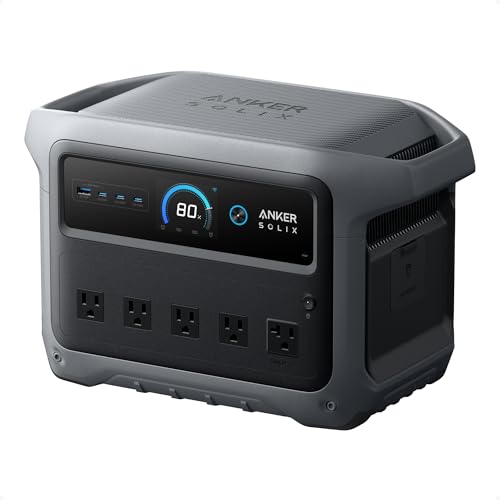
Anker SOLIX C1000 Gen 2 — Best UPS-Mode All-Rounder
UPS switchover: 10 ms on all AC ports (per Anker)
1,024 Wh · 2,000W output · LiFePO4
Current Price on Amazon: see current price on Amazon
Anker certifies 10 ms switchover on every AC outlet of the Gen 2 — true-UPS-class speed with 1,024 Wh behind it. Keeps a full workstation plus the fridge running through an outage, then recharges in ~49 minutes when power returns.

EcoFlow Delta 3 Plus — Best for Bigger Home Offices
UPS mode with auto-switchover (10 ms class per EcoFlow)
1,024 Wh · 1,800W output · LiFePO4
Current Price on Amazon: see current price on Amazon
1,024 Wh, 1,800W output, and expansion to 3 kWh — enough to carry a multi-monitor setup, NAS, and networking closet through a long outage, with EcoFlow's app scheduling charging around time-of-use rates.

Bluetti AC200L — Best High-Capacity UPS Mode
UPS mode switchover: 20 ms (per Bluetti)
2,048 Wh · 2,400W output · LiFePO4
Current Price on Amazon: see current price on Amazon
For the "office plus essentials" tier: 2,048 Wh (expandable to 8.2 kWh) with a 20 ms UPS mode and time-of-use scheduling. The 20 ms figure is fine for routers, NAS drives, and most modern PCs — see the caveat below for what it isn't.
All four are on our Black Friday watchlist — a UPS-mode unit is one of the most practical work-from-home upgrades of the sale.
Power Station vs UPS FAQ
Can a power station replace a UPS?
For most home setups, yes. Routers, modems, laptops, monitors, NAS drives, and CPAPs ride through a 10–30 ms switchover without noticing, and the power station then runs them for hours instead of minutes. For servers, desktop gaming rigs, or anything mission-critical, keep a dedicated UPS rated at 10 ms or faster.
What does UPS mode on a power station actually do?
You leave the power station plugged into the wall with your devices plugged into it. Grid power passes through normally; when the grid drops, an internal transfer switch flips your devices onto the battery — in 10–30 ms depending on the model. Some brands call it EPS mode.
Is it OK to leave a power station plugged in all the time?
Modern LiFePO4 units are designed for it — battery management systems hold the charge level and prevent overcharging, and several models let you cap the standing charge (e.g., 80%) to maximize battery lifespan in permanent UPS duty.
Will my desktop PC survive the switchover?
Most modern desktop power supplies hold output through a 10–20 ms gap (the ATX spec requires ~17 ms of hold-up at load), so a 10 ms-class unit like the C1000 Gen 2 or River 3 Plus is generally fine. Heavily loaded gaming PSUs have less margin — that's the case for a dedicated UPS.
Which is cheaper — a UPS or a power station?
A consumer UPS is cheaper upfront; a power station is cheaper per usable watt-hour and does triple duty as outage backup and camping power. If you'd ever buy both, the power station replaces two purchases.