Runtime Guide · Updated September 18, 2026
Running Starlink on a Power Station
Starlink is one of the best-matched loads a power station can carry. It draws a modest, steady amount of power around the clock rather than spiking the way a motor or a heater does, which means a single 1,000 Wh station has historically covered roughly a full day of connectivity in our runtime modelling. For anyone who depends on internet access during an outage, it is a far better use of battery capacity than almost anything else in the house.
As an Amazon Associate, SolarGenAdvisor earns from qualifying purchases made through links on this page, at no additional cost to you.
The Short Answer
What Starlink draws
Roughly 40–75W typical
A standard dish plus its router, averaged over time. Adding a third-party router or mesh node adds to that. Check the Starlink app for your own actual usage.
Runtime on 1,000 Wh
~14–18 hours
A full overnight outage, or most of a working day. With solar input during daylight, this becomes an indefinite off-grid setup.
The surprise factor
Snow-melt mode
In cold weather the dish can heat itself to clear snow, and that multiplies power draw substantially. In a winter outage, this is the setting that will drain your battery fastest.
Capacity to aim for
1,000 Wh minimum
2,000 Wh if you also want to run a refrigerator or lighting from the same battery, which is the more common real-world plan.
How Long Each Station Runs Starlink
Estimates use a 15% inverter loss and assume a standard dish plus router. The two columns show typical draw and a heavier draw, so you can see how sensitive the answer is to what your install actually consumes:
| Power station | Capacity | At ~60W draw | At ~75W draw | Current price |
|---|---|---|---|---|
| Anker SOLIX C300 DC | 288 Wh | ~4 hrs | ~3 hrs | $249.99 |
| Jackery Explorer 1000 V2 | 1,070 Wh | ~15 hrs | ~12 hrs | $559.00 |
| Anker SOLIX C1000 Gen 2 | 1,024 Wh | ~14 hrs | ~11 hrs | $499.99 |
| Jackery Explorer 2000 Plus | 2,042 Wh | ~28 hrs | ~22 hrs | see current price on Amazon |
| Bluetti Elite 200 V2 | 2,073 Wh | ~29 hrs | ~23 hrs | $899.00 |
| Anker SOLIX F3000 | 3,072 Wh | ~43 hrs | ~34 hrs | $1,398.98 |
Runtime ≈ capacity × 0.85 ÷ average draw. Starlink's draw varies with dish model, obstruction scanning, weather and firmware, so treat these as planning figures rather than exact numbers. Your own usage figure is visible in the Starlink app.
Pairing a station with a portable solar panel turns a one-day reserve into a continuous off-grid supply — a 200W panel in decent sun more than covers Starlink's average draw, which is what makes an RV or cabin install genuinely practical.
Snow-Melt Mode: The One Setting That Changes Everything
If you are backing up Starlink for winter outages, this is the detail that decides whether your plan works. To keep the dish clear in snow, Starlink can raise its power draw to heat the antenna surface. That heating load is far larger than the communications load, and it is the reason a battery that comfortably runs Starlink all day in summer can be emptied in a fraction of that time in a snowstorm.
If you rarely get snow
Ignore it. Size from the table above and you are done. Heating will not engage in conditions you do not experience.
If you do get snow
Size up a tier, or plan to manage heating manually during an outage — clearing the dish by hand when accumulation matters and leaving heating off when it does not. On battery power, a brush is cheaper than a battery.
Check the setting name
The exact menu wording changes with firmware and app version. Look for the snow-melt or heating option in the app's settings and confirm what your own unit is doing rather than assuming it is off.
Three Very Different Reasons to Do This
Outage backup for a home office or a rural property
The most common reason, and the simplest. A 1,000 Wh station keeps connectivity alive overnight while the grid is down, and because Starlink is a light load you can run it alongside a refrigerator or some lighting on a 2,000 Wh unit. If losing internet means losing income, this is the cheapest insurance in the category. See our hurricane and outage guide for the wider priority list.
RV, van life and remote work on the road
Starlink has become standard equipment for people working from the road, and it changes the power budget because connectivity now has to run all day rather than for a few hours. A 1,000 Wh station plus 200W of solar covers it; our RV and van life guide covers the broader setup.
Off-grid cabins and remote installations
Here Starlink is a permanent load rather than a backup, so the design question changes: you need enough panel wattage to cover the average draw every day, plus battery capacity to carry through the night and poor-weather days. That is a capacity-planning exercise, not a battery-purchase one — start with our solar size calculator to total the daily load.
One practical note before you buy: check the power input your dish and router expect. Most Starlink kits run from a standard AC outlet, which is what these stations provide, but some configurations and aftermarket DC setups differ. Confirm the requirement for your specific model rather than assuming.
Power Stations for Starlink
Ordered by how much Starlink runtime each unit buys. Specs come from our own product database, and the price badges come from our daily price log.
Best all-round choice
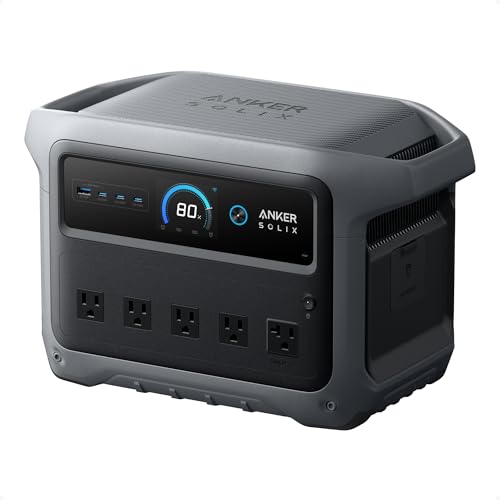
Anker SOLIX C1000 Gen 2
1,024 Wh · 2,000W output · 3,000W surge · 24.9 lb · SGA rating 92/100
Current price on Amazon: $499.99
1,024 Wh with 2,000W output and 600W of solar input, in a 24.9 lb package. Starlink is a light, continuous load, so capacity and solar input are what matter — and roughly 14 hours of runtime covers an overnight outage comfortably. The ~49-minute recharge is the standout for multi-day events: you can refill it in the gaps between rolling blackouts.
Best value
Jackery Explorer 1000 V2
1,070 Wh · 1,500W output · 3,000W surge · 23 lb · SGA rating 93/100
Current price on Amazon: $559.00
1,070 Wh at just 23 lb. The lightest way to get a full day of Starlink runtime, with slightly more capacity than the Anker at this tier. If you want one unit that covers Starlink plus a fridge and some lighting, this is the most efficient place to spend the money.
Best for multi-day outages
Jackery Explorer 2000 Plus
2,042 Wh · 3,000W output · 6,000W surge · 43 lb · SGA rating 91/100
Current price on Amazon: see current price on Amazon
2,042 Wh expandable to roughly 24 kWh, with 1,000W of solar input. Around 28 hours of Starlink runtime per charge, and the expansion path means you can grow it if the outages in your area routinely run past a day. The 1,000W solar ceiling is what makes recharging realistic off-grid.
Best if Starlink is one load among many
Anker SOLIX F3000
3,072 Wh · 3,600W output · 4,860W surge · 91.5 lb · SGA rating 93/100
Current price on Amazon: $1,398.98
3,072 Wh expandable to 24 kWh with 3,600W output, 240V split-phase capability and 6,000W of AC recharge. If the plan is Starlink plus a well pump, a furnace blower or a whole essential circuit, this is the tier where that stops being a stretch. Roughly 43 hours of Starlink runtime on its own.
Prices shown are the current Amazon price. Badges come from our own daily price log — see the solar generator price tracker; they describe what we observed on the listing, not a manufacturer claim or a prediction.
Related Guides
Best Solar Generators for Power Outages
The full priority order for what to keep running
Running a Freezer on Battery
The other load that pairs well with Starlink on one station
Best Portable Solar Panels
How to make a Starlink setup self-sustaining
Storage & Maintenance
Keeping the station healthy between outages
Starlink Power FAQ
How many watts does Starlink use?
A standard dish plus its router typically averages somewhere in the 40–75W range over time, with heavier draw during obstruction scanning and firmware activity. Your own figure is visible in the Starlink app, and that number is the one worth sizing from.
How long will a 1,000 Wh power station run Starlink?
Roughly 14–18 hours, assuming a standard dish and router at typical draw. That covers an overnight outage with margin, or a full working day if you are not also running other loads. Adding solar input during daylight extends it indefinitely in decent weather.
Why did my battery drain much faster than expected?
Snow-melt mode is the usual answer in winter: the dish heats its surface to shed snow, and that heating load dwarfs normal communications draw. Heavier draw can also come from obstruction scanning, a third-party router or mesh node, or a cold battery delivering reduced capacity until it warms up.
Can I run Starlink and a refrigerator on the same station?
Yes, and it is a sensible pairing because the two loads behave differently — Starlink is a steady low draw while a refrigerator cycles. Combined they average roughly 200–300W, so a 2,000 Wh station covers most of a day. Stagger the refrigerator's startup so its compressor surge does not coincide with anything else starting.
Will a power station run Starlink indefinitely with solar?
In good sun, yes — Starlink's average draw is low enough that a 200W panel typically covers it, with the battery carrying the overnight hours. The limits are consecutive days of heavy cloud, winter sun angles, and snow-melt heating. For a permanent off-grid installation, size the array for the worst month rather than the best.
Is a power station cheaper than a generator for Starlink backup?
For this particular load, usually yes. Starlink is exactly the profile a battery suits — light, steady, and needed precisely when the grid is down. A fuel generator has to run continuously to keep it alive, which is wasteful, noisy, and cannot be used indoors. See our generator comparison for the wider trade-off.
What size station should I buy for Starlink?
1,000 Wh is the sensible minimum and covers an overnight outage on its own. Choose 2,000 Wh if you want to run Starlink alongside a refrigerator, lighting or a furnace blower, which is the more common real-world plan, or 3,000 Wh and up if connectivity is only one of several essential circuits.