
Renter’s Guide · Updated November 2026
Best Solar Generator for Apartment Living 2026: Renter-Friendly Backup Power Without a Roof
Short answer
Yes, a solar generator works in an apartment. You don’t need a roof, because it charges from a regular wall outlet, and a folding panel on a balcony is optional. For most renters the best pick is a 1 kWh LiFePO4 station of about 25 lb that refills from the wall in about an hour, such as the Anker SOLIX C1000 Gen 2. That size keeps a router online for more than two days and a fridge cold for most of a day. If you mainly need Wi-Fi and phones, a 10 lb, 286 Wh station is enough.
As an Amazon Associate, SolarGenAdvisor earns from qualifying purchases made through links on this page, at no additional cost to you.
 By
What Makes a Power Station Good for an Apartment?
Apartment buyers need different things from campers and homeowners. We picked six stations from the ones already rated on this site using five renter-specific filters:
- ✓ Weight you can carry up stairs. Every pick is 26 lb or less.
- ✓ Fast wall charging. Most renters have no solar spot, so the wall outlet is the main way to charge. Five of the six refill in about an hour.
- ✓ UPS switchover for a router, CPAP or fridge, so they stay on when the grid drops.
- ✓ Low published noise, because your bedroom wall is also your neighbor’s.
- ✓ LiFePO4 chemistry, the more heat-tolerant lithium type (all six use it; see our LiFePO4 guide).
Ratings are from our scoring: an AI-synthesized assessment built from published specs, logged Amazon prices and Amazon customer reviews, scored on the six-dimension matrix. We did not test these units ourselves.
Apartment Power Station Comparison: Weight, Wall Charging, UPS, Noise
Capacity, output, weight and rating come from our product database. Charge time, UPS switchover and noise are published manufacturer or retailer figures; sources are listed at the bottom of the page.
| Model | Capacity / Output | Weight | Wall Charge | UPS Switch | Noise (published) | Rating | Price |
|---|---|---|---|---|---|---|---|
| Anker SOLIX C1000 Gen 2 | 1,024 Wh / 2,000W AC | 24.9 lb | 49 min to full (1,600W AC) | 10 ms | Under 20 dB claimed (B&H spec listing only) | 92/100 | $529.99 |
| Jackery Explorer 1000 V2 | 1,070 Wh / 1,500W AC | 23.8 lb | Under 1 h in app Emergency mode | ≤20 ms | No published dB figure confirmed | 93/100 | $559.00 |
| Bluetti Elite 100 V2 | 1,024 Wh / 1,800W AC | 25 lb | 45 min to 80% (Turbo); ~70 min full | 10 ms | ≤30 dB under 600W loads (Bluetti) | 90/100 | $499.00 |
| EcoFlow Delta 3 Plus | 1,024 Wh / 1,800W AC | 26 lb | 56 min to full (1,500W AC) | <10 ms | No published dB figure found | 89/100 | $719.00 |
| EcoFlow River 3 Plus | 286 Wh / 600W AC | 10.4 lb | ~1 h to full (380W AC) | <10 ms | Under 30 dB (EcoFlow listing) | 86/100 | $299.00 |
| Anker SOLIX C300 DC | 288 Wh / 300W DC only | 6.17 lb | ~1 h to 80% with two 140W USB-C chargers (not included) | Not confirmed for this model | No figure confirmed for the DC model | 86/100 | $189.99 |
The 6 Best Portable Power Stations for an Apartment
Ordered by how well each fits a typical one- or two-bedroom rental. Prices change daily; deals on these models have historically clustered around Prime Day, Black Friday and Cyber Monday.
1. Best Overall for Apartments
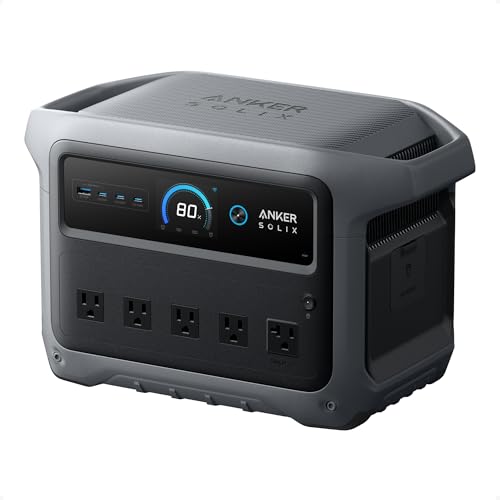
Anker SOLIX C1000 Gen 2 · 92/100
1,024 Wh · 2,000W AC · 24.9 lb · LiFePO4 · 600W solar input
Price: $529.99
One of the fastest published wall recharges in the 1 kWh class: Anker’s datasheet lists a full charge in 49 minutes at 1,600W, so a renter can top it up the moment a storm warning lands. 2,000W of output covers a full-size fridge plus a microwave burst, and the 10 ms UPS switchover keeps a router online when the grid blinks.
- ✓ 49-minute published wall recharge
- ✓ 2,000W output handles a fridge and short kitchen loads
- ✓ 10 ms UPS switchover (Anker datasheet)
- ✗ 24.9 lb is a one-hand carry, not a backpack
- ✗ The 1,600W fast-charge mode needs a circuit with nothing else big on it
2. Lightest 1 kWh Pick (Walk-Up Buildings)

Jackery Explorer 1000 V2 · 93/100
1,070 Wh · 1,500W AC · 23.8 lb · LiFePO4 · 400W solar input
Price: $559.00
At 23 lb it is the lightest 1 kWh station in our database, which matters on a third-floor walk-up. Jackery’s app-enabled Emergency charge mode refills it in under an hour, and its 1,070 Wh is the largest battery of the 1 kWh picks here. The UPS switchover is slower (≤20 ms), so it suits routers better than desktop PCs.
- ✓ 23 lb: lightest 1 kWh station we rate
- ✓ Highest SolarGenAdvisor rating of the six
- ✓ Under-1-hour charge via the app
- ✗ ≤20 ms switchover is slower than the 10 ms picks
- ✗ 1,500W output is the lowest of the 1 kWh picks
3. Quietest 1 kWh Pick

Bluetti Elite 100 V2 · 90/100
1,024 Wh · 1,800W AC · 25 lb · LiFePO4 · 1000W solar input
Price: $499.00
Bluetti quotes 30 dB or less at loads under 600W, which covers a fridge, router and lights, the loads a renter actually runs overnight. It pairs a 10 ms UPS with 1,000W of solar input in a 25 lb body. It is not expandable, so the 1,024 Wh you buy is the 1,024 Wh you keep.
- ✓ Lowest published noise figure of the 1 kWh picks
- ✓ 10 ms UPS switchover
- ✓ 1,000W solar input if you ever add panels
- ✗ Not expandable
- ✗ Fast Turbo charging is quoted to 80%, not to full
4. Best for Longer Outages (Expandable)

EcoFlow Delta 3 Plus · 89/100
1,024 Wh · 1,800W AC · 26 lb · LiFePO4 · 1000W solar input
Price: $719.00
The only 1 kWh pick here that grows: an extra battery takes it to about 5 kWh, so you can start small and add capacity if a fridge-length outage hits. It recharges from the wall in 56 minutes and switches over in under 10 ms. At 26 lb it is the heaviest of the six.
- ✓ Expands to about 5 kWh with an extra battery
- ✓ Under-10 ms UPS switchover
- ✓ 56-minute wall recharge
- ✗ 26 lb base unit; an extra battery adds a second heavy box
- ✗ No published noise figure
5. Best Small Pick: Wi-Fi + Phones

EcoFlow River 3 Plus · 86/100
286 Wh · 600W AC · 10.4 lb · LiFePO4 · 220W solar input
Price: $299.00
A 10.4 lb station that lives on a bookshelf, keeps a router and modem online for most of a day. A 50W CPAP gets about 5 hours, so add the extra battery (858 Wh total) or step up to 1 kWh for full CPAP nights. EcoFlow lists it under 30 dB with an under-10 ms UPS switchover, and it recharges from the wall in about an hour. It is the most affordable route into AC backup here.
- ✓ 10.4 lb: shelf-sized
- ✓ Under-10 ms UPS for a router
- ✓ Expands to 858 Wh with an extra battery
- ✗ 286 Wh will not keep a full-size fridge cold for long
- ✗ 600W output rules out kitchen appliances
6. Budget DC-Only Pick

Anker SOLIX C300 DC · 86/100
288 Wh · DC only, 300W · 6.17 lb · LiFePO4 · 100W solar input
Price: $189.99
No AC outlet at all, just 300W of USB-C and car-socket output, but for phones, laptops and USB-C or 12V devices it is the lightest, cheapest way to ride out an evening outage at 6.2 lb. It charges through USB-C, and the Amazon listing states no wall charger is included, so budget for a 140W USB-C charger if you do not own one.
- ✓ 6.2 lb
- ✓ Lowest price tier of the six
- ✓ Charges from USB-C chargers you may already own
- ✗ No AC outlet: no fridge, no CPAP with a standard power brick
- ✗ No wall charger in the box
No Roof? How Renters Actually Charge a Solar Generator
“Solar generator” is the marketing name for a battery power station that can take solar input. In an apartment, solar is the backup charging method, not the main one:
1. Wall outlet (main method)
Keep the station topped up from the wall so it’s full when an outage starts. The fast-charge modes above pull a lot of power: 1,500–1,600W for the C1000 Gen 2 and Delta 3 Plus. A standard 15-amp, 120-volt circuit tops out at 1,800W (15 × 120), so don’t fast-charge on the same circuit as a space heater, microwave or hair dryer. Use the slower charge setting in the app if your breaker trips. Plug straight into the wall. The FDNY advises against charging lithium-ion batteries through an extension cord or power strip (FDNY 2025–26 fire safety bulletin).
2. A folding panel on the balcony (optional)
A 100–200W folding panel on a kickstand feeds the station through a cable that runs through the balcony door, with nothing attached to the building. To estimate what you’ll get, assume about 70% of the panel’s rating during direct-sun hours. A 200W panel with 4–5 hours of unshaded sun yields roughly 560–700 Wh, which is most of a 1 kWh battery. North-facing, shaded or upper-floor-overhang balconies can produce far less. Treat these figures as estimates, and expect winter output to be lower (cloudy-day and winter charging). Weigh the panel down or fold it away in wind, and don’t hang anything over the railing unless your lease allows it. Panel options are in our portable solar panel guide.
3. A sunny window (trickle only)
A panel propped behind glass produces a fraction of its rated output because the glass, the angle and partial shading all cut into it. It’s fine for topping up a small station over several days, but don’t count on it during an outage. More detail is in can you use a solar generator indoors.
Is “balcony solar” the same thing?
No. “Balcony solar” or plug-in solar usually means a panel and microinverter that plug into a wall outlet and push power back into your apartment’s wiring. That is a different product with its own legal and utility questions, and its status depends on your state. See our plug-in and balcony solar legality tracker. A power station with a folding panel never connects to the building’s wiring. You plug appliances into the station.
Lease, HOA and Building Rules: What to Check Before You Buy
We can’t tell you what your lease allows. Rules vary by landlord, HOA, city fire code and state, and we don’t restate laws here. These are the clauses worth reading before you buy:
- • Balcony and exterior rules. Many leases and HOA rules limit what can sit on or hang from a balcony or railing. A freestanding folding panel is the least intrusive option, but check before you use one.
- • Battery and fire-safety clauses. Some buildings now address lithium-ion batteries directly, often written with e-bikes in mind. Ask the management office if the wording is unclear.
- • Renter’s insurance. If you’re unsure whether your policy cares about stored batteries, ask your insurer.
- • Gas generators. These are a safety question first, not a lease question. The CPSC says portable gas generators should run outdoors only, far from doors, windows and vents, and never inside a home or garage even with the windows open. On an apartment balcony there is usually nowhere that rule can be met, which is why battery power stations are the default for renters (indoor-safe generators explained).
A portable power station plugs into a wall outlet the same way a laptop charger does, and appliances plug into it. Don’t connect any generator or battery to building wiring. That work requires a licensed electrician and, in a rental, the landlord’s approval.
Fire Safety in an Apartment: Chemistry, Listings and Placement
A battery power station makes no carbon monoxide. In a multi-unit building, the risk to manage is the lithium battery itself. Three things help:
LiFePO4 chemistry
All six picks use lithium iron phosphate (LiFePO4), which is more resistant to thermal runaway than the NMC cells in older stations and most power banks (LiFePO4 vs NMC). “More resistant” doesn’t mean fireproof, so the placement rules below still apply.
A safety listing from a recognized lab
The North American safety standard written for portable power stations is UL 2743 (Portable Power Packs). It evaluates the whole assembled unit, not just the cells (UL Solutions; Intertek). A listing can come from UL, Intertek (ETL) or CSA. We could not confirm a UL 2743 listing record for each of these six models in a public certification database, so we don’t claim one for any of them. If your building requires a listed product, check the rating label on the unit and the lab’s online directory before you buy.
Where to put it (and where never to put it)
- ✗ Never near your exit. The FDNY says not to charge lithium-ion batteries next to an apartment door or window, because a fire there can block your escape. Keep the station off your path to the door.
- ✗ Not on a bed or couch, or next to drapes or paper. Use a hard, flat floor or shelf with a few inches of clearance around the vents.
- ✗ Don’t charge it overnight or while you’re out. The FDNY advises against unattended charging. Charge while you’re home and awake, then let it sit full.
- ✗ Don’t keep a damaged, swollen or end-of-life battery in the apartment, and never put one in building trash.
Source: FDNY Fire & Emergency Preparedness Bulletin 2025–26. The guidance is written mainly for e-bike batteries, but the placement logic applies to any lithium-ion battery in an apartment.
Stairs, Elevators and Weight: What You Can Really Carry
In an apartment you carry the station from the delivery lobby, maybe up stairs, and out to the balcony when you charge from solar. These are the realistic weight tiers:
| Weight | What it feels like | Examples (from our database) |
|---|---|---|
| Under 11 lb | One hand, any staircase, lives on a shelf | Anker C300 DC (6.17 lb), EcoFlow River 3 Plus (10.4 lb) |
| 23–26 lb | A full carry-on suitcase; fine for a flight or two of stairs | Jackery 1000 V2 (23.8 lb), C1000 Gen 2 (24.9 lb), Elite 100 V2 (25 lb), Delta 3 Plus (26 lb) |
| 35–40 lb | Two hands; awkward on a walk-up; plan to leave it in one spot | Jackery Explorer 2000 v2 (39.5 lb) for renters who want 2 kWh in one box |
During a power outage the elevator is out too, so pick a weight you can carry up your stairs on your own.
How Big a Solar Generator Does an Apartment Need?
Size it to the outage you’re planning for. The table uses the standard formula: rated Wh × 0.85 ÷ average load in watts. The 0.85 covers inverter and conversion losses.
| Load (average draw) | EcoFlow River 3 Plus (286 Wh) | Anker SOLIX C1000 Gen 2 (1,024 Wh) | Jackery Explorer 1000 V2 (1,070 Wh) | Anker SOLIX C300 DC (288 Wh) |
|---|---|---|---|---|
| Wi-Fi router + modem · ~15W | 16 h | 58 h | 61 h | 16 h |
| Router + modem + 2 phone charges a day · ~17W | 14 h | 51 h | 54 h | 14 h |
| CPAP, no heated humidifier · ~50W | 4.9 h | 17 h | 18 h | n/a (no AC) |
| Full-size fridge (450 kWh/yr label) · ~51W | 4.8 h | 17 h | 18 h | n/a (no AC) |
| Fridge + router + phones · ~68W | 3.6 h | 13 h | 13 h | n/a (no AC) |
Assumptions: router + modem ~15W (appliance draw guide). Two phone charges ~40 Wh/day. CPAP 50W with no heated humidifier. The fridge figure comes from its EnergyGuide label: 450 kWh/yr ÷ 365 ≈ 1,230 Wh/day ≈ 51W average. Read your own label and substitute. The 1 kWh rows also apply to the Elite 100 V2 and Delta 3 Plus (1,024 Wh). The C300 DC can run a router only if the router takes USB-C or 12V DC, and it can’t run a fridge or a CPAP with a standard AC power brick.
Outage scenario: fridge + router + phones for 24–48 hours
The load
~68W average × 24 h ≈ 1,630 Wh a day of usable energy. Dividing by 0.85 gives about 1,920 Wh of rated capacity per day, or about 3,840 Wh for 48 hours.
With a 1 kWh station
About 13 hours of everything. Drop the fridge and the router and phones run for about 2 days. A closed fridge keeps food safe for about 4 hours without power (FoodSafety.gov), so you can run it in blocks to stretch the battery. For example, run it 2 hours on and 2 hours off with the door shut.
To cover 24–48 h fully
Pick one: a ~2 kWh station; a 1 kWh station you can expand (the Delta 3 Plus takes an extra battery); or a 1 kWh station plus a 200W balcony panel. On a sunny day the panel adds roughly 560–700 Wh, which is about a third of a day’s load. The full outage math is in our power outage guide.
Running a CPAP? See best solar generators for CPAP. For a fridge-first plan, see can a solar generator run a refrigerator. Still unsure on size? Our sizing guide walks through it.
Battery Backup for an Apartment: UPS Mode for Router, CPAP and Fridge
With UPS (pass-through) mode, the station sits between the wall and your device. When the grid drops, it switches to battery in 10–20 milliseconds, depending on the model. That’s fast enough that routers, modems, fridges and most CPAP machines keep running. Some desktop PCs and NAS boxes can still reboot during a 10–20 ms gap. For gear that can’t blink, a dedicated online UPS is the safer choice; see power station vs UPS. Of our six picks, five list a switchover time. We couldn’t confirm one for the Anker C300 DC.
Noise: Will Your Neighbors Hear It?
Battery stations have no engine. The only sound is a cooling fan, which spins up during fast charging and heavy loads. Published figures: Bluetti quotes 30 dB or less for the Elite 100 V2 under 600W loads, and EcoFlow lists the River 3 Plus under 30 dB. For the C1000 Gen 2, the only figure we found was a retailer’s “under 20 dB,” so treat it as a claim. We found no published dB figure for the Jackery 1000 V2 or the Delta 3 Plus. In practice, the loud moments are fast charging and microwave-level loads. Charge in the daytime and the fan noise at night is mostly a non-issue. For a broader quiet-power comparison, see our quietest generator guide.
Storing a Power Station in a Small Apartment
- • Where: a closet floor or low shelf with airflow, away from the front door and from heat sources like radiators, stoves and sunny windowsills.
- • Charge level: follow your manual. Most makers recommend partial charge for long storage and a top-up every few months, then charging to full before a forecast storm.
- • Use it: run your router or laptop from it now and then. Regular use keeps you familiar with it and shows a fault before an outage does.
- • Moving out: keep the box. A station is easier to move than a gas generator, but it’s still a heavy battery.
Full guidance: power station storage and maintenance. On a tight budget? Our best solar generators under $500 list has more small-station options.
Who Should Buy a Solar Generator for an Apartment, and Who Should Skip
Buy one if…
- ✓ You work from home and an outage costs you a workday
- ✓ You rely on a CPAP or other plug-in medical device overnight
- ✓ Your area sees storm, heat-wave or planned shutoff outages
- ✓ You want backup you can take with you when you move
Skip it (or go smaller) if…
- ✗ Outages are rare and short; a large USB power bank covers phones
- ✗ You need to run window AC or electric heat for days; no portable station here can
- ✗ Your building bans lithium batteries above a size limit (check first)
- ✗ You can’t lift about 25 lb and have no elevator; look at the 10 lb class
Our verdict for renters
The Anker SOLIX C1000 Gen 2 is the best all-round apartment pick: about 25 lb, a 49-minute wall recharge, a 10 ms UPS switchover and 2,000W of output. If you climb stairs every day, the 23 lb Jackery Explorer 1000 V2 is the lighter alternative. If you mainly need Wi-Fi and phones, the River 3 Plus covers them at 10.4 lb.
Solar Generators for Apartments: FAQ
Can you use a solar generator in an apartment?
Yes. A solar generator is a battery power station with no engine and no exhaust, so it can run indoors. It charges from a wall outlet, and a folding solar panel on a balcony is optional. Check your lease for any battery or balcony rules, and keep the unit away from your exit.
Can I use a solar generator on a balcony?
You can set a folding solar panel on a balcony and run its cable to a power station indoors. Keep the station inside, out of rain and direct heat. Check your lease or HOA rules for items on balconies and railings. Never run a gas generator on a balcony; the CPSC says gas generators belong outdoors, far from doors, windows and vents.
What size power station do I need for an apartment?
For Wi-Fi and phones, about 300 Wh covers most of a day. A CPAP night at about 50 watts needs roughly 400–500 Wh, so a 1 kWh station is the safer size for CPAP users. To keep a fridge running as well, plan on 1 kWh for most of a day, or about 2 kWh for a full 24 hours. Use rated Wh × 0.85 ÷ average watts to estimate runtime.
How long will a power station run a fridge during an apartment power outage?
A full-size fridge rated 450 kWh a year averages about 51 watts. A 1,024 Wh station therefore runs it for about 17 hours, or about 13 hours if a router and phones share the battery. Running the fridge in on-off blocks with the door shut stretches that further.
Is balcony solar legal for renters?
It depends on your state, utility and lease. Plug-in balcony solar feeds power into your apartment wiring, which is different from charging a power station with a panel. Our plug-in solar legality tracker lists the current status by state.
Is a lithium power station a fire risk in an apartment?
Any lithium battery carries some risk. LiFePO4 chemistry is more resistant to thermal runaway than older NMC cells. Check for a safety listing such as UL 2743 on the label. The FDNY also advises against charging next to your apartment door or window, charging unattended or overnight, and plugging into a power strip.
Can a portable power station work as a UPS for my router?
Yes. Most current models have a UPS or pass-through mode that switches to battery in 10 to 20 milliseconds when the grid fails. That is fast enough for routers, modems and most CPAP machines. A 1 kWh station can keep a typical 15-watt router and modem online for about two days.
Related: plug-in solar legality by state · indoor-safe generators
Sources
Checked October 31 – November 1, 2026. Capacity, output, weight, chemistry, solar input and ratings come from our product database. Anker SOLIX C1000 Gen 2: Amazon listing (49-minute charge); Anker datasheet (1,600W AC, 49 min, 10 ms UPS); Anker SOLIX product page; B&H spec listing (noise claim, single source). Jackery Explorer 1000 V2: Amazon listing (1-hour fast charge); retailer spec listing (UPS ≤20 ms); EFTM review (app Emergency charge under 1 hour, <20 ms switchover). EcoFlow Delta 3 Plus: Amazon listing (56-minute charge); StorageReview (1,500W AC, 56 min, UPS <10 ms); Norwich Camping spec sheet (UPS <10 ms). Bluetti Elite 100 V2: Amazon listing (0–80% in 45 min, 10 ms UPS); Bluetti figures as cited in our Elite 100 V2 review (≤30 dB under 600W, ~70 min full). EcoFlow River 3 Plus: Amazon listing (1-hour charge, <10 ms UPS, <30 dB); EcoFlow US product page and CT Hardware spec listing as cited in our River 3 Plus review. Anker SOLIX C300 DC: Amazon listing (USB-C charging, no wall charger included); The Gadgeteer and Anker SOLIX C300X DC page (dual 140W USB-C input, about 80% in 1 hour). Safety: FDNY 2025–26 bulletin; CPSC Carbon Monoxide Information Center; UL Solutions, portable power pack testing; FoodSafety.gov and UConn Extension (fridge about 4 hours closed).