
Buying Guide · Updated November 2026
Best Laptop Power Bank 2026: 5 Picks Under the 100 Wh Flight Limit
A laptop power bank needs two things a phone bank doesn't: a USB-C Power Delivery port rated 65 to 140W, and as many watt-hours as the airlines allow, which is 100 Wh without approval. For most people, the UGREEN Nexode 25,000mAh 165W (90 Wh, a built-in 140W cable) is the pick and has our top score. The cheaper UGREEN Nexode 145W is the value choice. For a 16-inch MacBook Pro and the fastest recharge, get the Anker Prime 300W (99.75 Wh). The INIU P62-E1 is the budget and ultralight pick at about 324 g, and the Anker 25K 165W with its retractable cable makes the easiest gift.
As an Amazon Associate, SolarGenAdvisor earns from qualifying purchases made through links on this page, at no additional cost to you. Scores are AI-synthesized from manufacturer product pages and specs, independent published reviews, Amazon listing details and logged Amazon prices; we did not test these power banks.
 By
Quick Verdict
Match the bank's best USB-C port to your laptop's charger. If your laptop came with a 140W charger (a 16-inch MacBook Pro or a big Windows laptop), you need a 140W port: the UGREEN Nexode 165W has one on a built-in cable, and the Anker Prime 300W has two plus the fastest recharge. For a 14-inch MacBook Pro, MacBook Air or most ultrabooks, 100W is plenty, and the UGREEN Nexode 145W or Anker 25K 165W covers it. If you mostly need a top-up for a light laptop, tablet or handheld console, the INIU P62-E1 is about half the weight. All five are under 100 Wh, so they fly in your carry-on without airline approval. Need to run a laptop for a whole day off-grid, or through a power outage? See power bank vs power station.
Before You Fly
- Power banks go in your carry-on, never checked baggage. The FAA says spare lithium batteries, "including power banks," must be carried in carry-on baggage only, and if your bag is checked at the gate you must take the power bank out and keep it with you (FAA PackSafe).
- 100 Wh is the line. The FAA limits rechargeable lithium-ion batteries to 100 Wh each. With airline approval you may carry up to two spares of 101 to 160 Wh (FAA PackSafe). Every pick on this page is rated 99.75 Wh or less.
- Airlines can be stricter. The FAA notes many airlines limit how many power banks you can bring "regardless of Wh capacity." Southwest, for example, requires a power bank in use to stay visible, not in a bag (Gizmodo), and since April 20, 2026 allows one per passenger and bans recharging it from seat power (Islands; NewsNation). Check your airline before you go.
- Protect the terminals and skip damaged packs. The FAA says to keep spares in retail packaging, a case or a pouch, and not to fly with damaged or recalled batteries.
How We Score Laptop Power Banks
We use one rubric for every power bank on this page. As on our jump starter and trickle charger guides, the relative dimensions compare the picks with each other on this page. A power bank score isn't comparable with a power-station score. Each score is AI-synthesized from the maker's product page or spec sheet, independent published reviews, Amazon listing details and the Amazon price we logged on November 6, 2026. We did not test any power bank. Every input below is published for all five picks; a missing figure would mean dropping the model or the dimension, never scoring it as zero. Fit-for-purpose dimensions (laptop output, Wh under 100, value and recharge speed) carry 85 of the 100 points and weight 15, so a light, cheap bank isn't pushed to the bottom. Weights total 100:
- Laptop output (30): the maker's highest single-port USB-C PD rating, banded on Apple's fast-charge thresholds: 140W, enough for a 16-inch MacBook Pro (100 points); 100W, above the 96W a 14-inch Pro needs (85); 65W, below the 70W a MacBook Air needs (65)
- Capacity (20): the maker's Wh rating relative to the largest here (99.75 Wh), all under the FAA's 100 Wh line
- Value (20): watt-hours per dollar at the live price, relative to the best here
- Recharge speed (15): the ideal refill time, Wh ÷ the maker's maximum input watts: 0.5 h or less (100), up to 1 h (80), up to 1.5 h (65), over 1.5 h (55)
- Portability (15): the lightest weight here (324 g) divided by this bank's weight
Warranty isn't scored, because we couldn't confirm UGREEN's term in its published material (Anker lists 18 and 24 months, INIU 3 years). The two UGREENs are a point apart; the UGREEN 145W's score uses UGREEN's current 140W spec, and at 100W per port it would score 77. Real recharge times are longer than the ideal figure, because charging slows near full. The Anker 737 is described below but not scored, because Anker doesn't publish its Wh rating.
The 5 Best Laptop Power Banks
These are USB-C laptop power banks with a published maker spec and a new, in-stock offer in Amazon's buy box when we checked on November 6, 2026. The Ankers are sold by AnkerDirect and the UGREENs by UGREEN GROUP LIMITED, the brands' own Amazon stores; the INIU is sold by Amazon.com. Specs come from each maker's page (linked), checked against independent reviews.
1. Top Score: Best Overall Laptop Power Bank
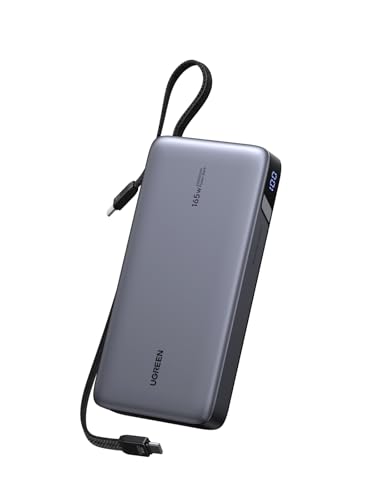
UGREEN Nexode 25,000mAh 165W Power Bank with Built-in Cables
25,000mAh · 90 Wh · 140W max per port, 165W total · 90W input · 550 g · Score 83/100
Price: $79.99
UGREEN's 165W Nexode is our top pick because it gets the things that matter for a laptop right, at a mid-range price when we checked. Its title and UGREEN's product page rate the 25,000mAh battery at 90 Wh, under the FAA's 100 Wh carry-on line (UGREEN). The first of its two built-in USB-C cables delivers up to 140W using the 28V, 5A step of USB PD 3.1, enough for a 16-inch MacBook Pro's fast-charge rate. The second cable and the separate USB-C port give up to 65W each, plus there's a USB-A port, for 165W total across four devices (Notebookcheck; techtest.org). UGREEN says it refills in about 2 hours at its 90W input. The cables mean you can't forget them, and the built-in 140W cable saves buying a separate 5A cable. The trade-offs are weight (550 g, about 1.2 lb) and a warranty term we couldn't confirm in UGREEN's published material.
Ports: 2 built-in USB-C cables (140W and 65W), 1 USB-C (65W), 1 USB-A. Recharge: About 2 h at 90W (UGREEN). Warranty: Not confirmed.
Pros
- ✓ 140W built-in USB-C cable (28V 5A, PD 3.1)
- ✓ 90 Wh: carry-on without airline approval
- ✓ 165W total across four devices
- ✓ 90W recharge, about 2 h (UGREEN)
Cons
- ✗ 550 g: heavier than the INIU
- ✗ Warranty term not published in the sources we used
- ✗ Built-in cables can't be replaced if they wear out
2. Best Value 25,000mAh Power Bank

UGREEN Nexode 25,000mAh 145W Power Bank
25,000mAh · 90 Wh · 140W max per port, 145W total · 65W input · 513 g · Score 82/100
This three-port UGREEN Nexode gives you the same 90 Wh as the top pick for a little less, because it skips the built-in cables. UGREEN's spec page lists the battery as 25,000mAh at 3.6V, which is 90 Wh, and rates the main USB-C1 port at 140W, with 145W total from two USB-C ports and one USB-A port (UGREEN). UGREEN's Amazon listing calls the port PD 3.1 and says it charges a 16-inch MacBook Pro from 0 to 56% in 30 minutes. One thing to know: techtest.org's earlier review found that the unit it bought topped out at 100W per port and had no 28V step (techtest.org), so UGREEN may have revised it. If 140W matters to you, check that the label lists 28V–5A. It recharges at only 65W (about 2 hours, UGREEN says), and it weighs 513 g (Creative Bloq). We score it on UGREEN's current spec; at 100W it would drop five points.
Ports: 2 USB-C (USB-C1 up to 140W), 1 USB-A. Recharge: About 2 h at 65W (UGREEN). Warranty: Not confirmed.
Pros
- ✓ 90 Wh for less than the other 25,000mAh picks when we checked
- ✓ 140W USB-C1 per UGREEN's current spec
- ✓ 513 g: lightest of the 25,000mAh picks
- ✓ Display shows remaining charge
Cons
- ✗ An earlier unit was reviewed at 100W max per port
- ✗ Slowest recharge of the 90 Wh picks (65W input)
- ✗ No built-in cables
3. Best for MacBook Pro 16, Fastest Recharge and Most Capacity Under 100 Wh

Anker Prime Power Bank 26,250mAh 300W
26,250mAh · 99.75 Wh · 140W max per port, 300W total · 250W input · 600 g · Score 79/100
Anker's Prime is the one to buy if you work all day on a big laptop and can't wait for a recharge. It holds 26,250mAh, which Anker rates at 99.75 Wh: the most energy you can carry on without asking the airline (Anker). Both USB-C ports are rated to 140W (28V, 5A), and the bank can supply 300W total across two USB-C and one 22.5W USB-A port, which Anker says keeps two MacBook Pros running at full speed (Engadget lists the same port ratings). Its standout is recharging. Plug a 140W charger into each USB-C port and it takes up to 250W, which Anker says reaches 50% in 13 minutes and 80% in 40 minutes. The display and app show live watts. It's the most expensive pick, by a lot when we checked, and weighs 600 g (1.32 lb). Anker's listing gives a 24-month warranty and notes the charging base is not included.
Ports: 2 USB-C (140W each, two-way), 1 USB-A (22.5W). Recharge: 50% in 13 min, 80% in 40 min with 250W dual-port input (Anker). Warranty: 24 months (Amazon listing).
Pros
- ✓ 99.75 Wh: the most under the 100 Wh carry-on line
- ✓ Two 140W USB-C ports, 300W total
- ✓ 250W dual-port recharge: 50% in 13 min (Anker)
- ✓ 24-month warranty (Anker listing)
Cons
- ✗ Priciest pick when we checked
- ✗ 1.32 lb (600 g), heaviest here
- ✗ Fastest recharge needs two 140W chargers and 5A cables
4. Best Budget and Ultralight Laptop Power Bank

INIU Cougar P62-E1 20,000mAh 65W Power Bank
20,000mAh · 74 Wh · 65W max per port, 65W total · 45W input · 324 g · Score 78/100
Price: $42.29
The INIU Cougar P62-E1 is the one to grab for a MacBook Air, ultrabook, tablet or Steam Deck when weight and price matter more than speed. INIU lists it at 20,000mAh and 74 Wh and about 11.4 oz (324 g), and Macworld measured the same 324 g and 11 × 7.1 × 2.9 cm (INIU; Macworld). That's more than a third lighter than any other pick. The main USB-C port gives up to 65W, the second about 35W and the USB-A 18W; it recharges at 45W, which Macworld says should take under two hours. INIU's listing gives a 3-year warranty, the longest we found, and includes a short detachable USB-C cable that doubles as a lanyard. It was also the only pick sold by Amazon.com when we checked. The limit is power: 65W charges any USB-C laptop that accepts 65W, but it's below the 70W Apple says a MacBook Air needs to fast-charge (Apple), and a big laptop will charge slowly or drain while in heavy use.
Ports: 2 USB-C (65W and 35-36W), 1 USB-A (18W); detachable 12 cm USB-C lanyard cable. Recharge: Under 2 h at 45W (Macworld). Warranty: 3 years (INIU, Amazon listing).
Pros
- ✓ Lightest pick: about 324 g (11.4 oz)
- ✓ Lowest price of our picks when we checked
- ✓ 3-year warranty (INIU listing)
- ✓ Sold by Amazon.com
Cons
- ✗ 65W max: no fast charging for a MacBook Air or Pro
- ✗ Smallest battery here (74 Wh)
- ✗ Slowest recharge (45W input)
5. Best Gift, and for Charging Several Devices

Anker Laptop Power Bank 25,000mAh 165W with Built-in Cables
25,000mAh · 90 Wh · 100W max per port, 165W total · 100W input · 595 g · Score 72/100
Anker's 25K Laptop Power Bank is the easiest of these to hand to someone who travels. It has two built-in USB-C cables: one retracts to about 2.3 ft and the other doubles as a carry strap. Add a USB-C port and a USB-A port and it can charge four devices at once (B&H). Anker rates the battery at 25,000mAh, "equal to 90Wh," with each USB-C rated up to 100W and 165W total when two USB-C devices are charging. With three or four devices, the total drops to 130W. It recharges at up to 100W in about 2 hours, and weighs 595 g (Anker). Engadget picked it as its best overall laptop power bank (Engadget). It scores last here for two reasons. Its 20V maximum means 100W, not 140W, so a 16-inch MacBook Pro charges below its fast-charge rate. It also cost more per watt-hour than the UGREENs when we checked. Anker's listing gives an 18-month warranty.
Ports: 2 built-in USB-C cables (one retractable, one strap), 1 USB-C, 1 USB-A (33W); 100W per USB-C. Recharge: About 2 h with a 100W charger (Anker). Warranty: 18 months (Amazon listing).
Pros
- ✓ Retractable cable plus a cable that doubles as a strap
- ✓ 100W on each USB-C, four devices at once
- ✓ 90 Wh: carry-on without approval
- ✓ 100W recharge, about 2 h (Anker)
Cons
- ✗ 100W max per port: no 140W for a 16-inch MacBook Pro
- ✗ Output drops to 130W total with three or four devices
- ✗ Cost more per Wh than the UGREENs when we checked
Other laptop power banks we checked
The Anker 737 (PowerCore 24K) is a popular 140W bank. Anker's spec sheet lists 24,000mAh and 28V, 5A on both USB-C ports, and a weight of 630 g (Anker), but Anker doesn't publish its watt-hour rating or cell voltage, so we can't state its Wh or score it against the others. We also left out the Baseus Blade HD 100W, a flat 20,000mAh bank that slides into a laptop sleeve. Its listings disagree on model number and weight (450 to 520 g), and we couldn't reach Baseus's spec page to settle them. INIU's 25,000mAh P63-E1 had only two left in stock when we checked, and INIU sells 100W and 140W versions under the same model name.
Laptop Power Bank Comparison Table
The five scored power banks. Capacity, watts and weight are the maker's published figures. "28V (PD 3.1)" means the bank lists the 28V, 5A step that USB PD needs to go above 100W.
| Power bank | Capacity | Max per port | Total out | 28V (PD 3.1) | Recharge input | Weight | Flies without approval | Score | Price |
|---|---|---|---|---|---|---|---|---|---|
| UGREEN Nexode 25,000mAh 165W Power Bank with Built-in Cables | 25,000mAh / 90 Wh | 140W | 165W | Yes | 90W | 550 g (1.21 lb) | Yes (under 100 Wh) | 83/100 | $79.99 |
| UGREEN Nexode 25,000mAh 145W Power Bank | 25,000mAh / 90 Wh | 140W | 145W | Yes | 65W | 513 g (1.13 lb) | Yes (under 100 Wh) | 82/100 | Check price at Amazon → |
| Anker Prime Power Bank 26,250mAh 300W | 26,250mAh / 99.75 Wh | 140W | 300W | Yes | 250W | 600 g (1.32 lb) | Yes (under 100 Wh) | 79/100 | Check price at Amazon → |
| INIU Cougar P62-E1 20,000mAh 65W Power Bank | 20,000mAh / 74 Wh | 65W | 65W | No | 45W | 324 g (0.71 lb) | Yes (under 100 Wh) | 78/100 | $42.29 |
| Anker Laptop Power Bank 25,000mAh 165W with Built-in Cables | 25,000mAh / 90 Wh | 100W | 165W | No | 100W | 595 g (1.31 lb) | Yes (under 100 Wh) | 72/100 | Check price at Amazon → |
Sources: Anker A1695 and A110A product pages (anker.com); UGREEN product and spec pages and UGREEN's Amazon listings; Notebookcheck and techtest.org (UGREEN 165W port ratings); Creative Bloq (UGREEN 145W weight); INIU's store page and Macworld (INIU P62-E1). The UGREEN 145W's 140W rating is UGREEN's current spec; an earlier unit was reviewed at 100W per port. INIU lists 74 Wh; one Amazon comparison table shows 73 Wh.
Can a Power Bank Charge a Laptop?
Yes, if the laptop charges over USB-C and the bank's USB-C port can supply enough watts. Most current laptops, including every MacBook, charge over USB-C Power Delivery (PD), and a USB-C power bank is just a battery with a PD charger built in. The laptop asks for a voltage, and the bank supplies it up to its rated watts. A higher-watt port won't harm a laptop that wants less, because the laptop only draws what it can accept (Engadget). Older laptops that charge only through a round barrel plug need an AC outlet or a bank with an AC port instead.
The wattage decides how fast. A port below what your laptop wants still charges it, more slowly, and a big laptop under heavy use may drain while plugged in. Apple's spec pages give the minimum USB PD power for fast charging on each MacBook, and that's the number to match:
| Laptop | Battery | Fast-charges at | Picks that can fast-charge it |
|---|---|---|---|
| 13-inch MacBook Air | 53.8 Wh | 70W or more | 4 of 5 (UGREEN 165W, UGREEN 145W, Anker Prime, Anker 25K) |
| 15-inch MacBook Air | 66.5 Wh | 70W or more | 4 of 5 (UGREEN 165W, UGREEN 145W, Anker Prime, Anker 25K) |
| 14-inch MacBook Pro | 72.4 Wh | 96W or more | 4 of 5 (UGREEN 165W, UGREEN 145W, Anker Prime, Anker 25K) |
| 16-inch MacBook Pro | 99.6 Wh | 140W or more | 3 of 5 (UGREEN 165W, UGREEN 145W, Anker Prime) |
Sources: Apple MacBook Air and MacBook Pro tech specs (MacBook Air; MacBook Pro), current models. Apple rates the 16-inch MacBook Pro battery at 100 Wh, with an actual rating of 99.6 Wh. Windows laptops: use the wattage printed on the laptop's own USB-C charger.
100W vs 140W power bank: which do you need?
A 100W power bank covers every MacBook Air, the 14-inch MacBook Pro (which fast-charges at 96W or more) and most Windows ultrabooks. A 140W power bank matters only for laptops that ship with a 140W charger, mainly the 16-inch MacBook Pro, which Apple says fast-charges with "140W or higher" (Apple). Getting above 100W takes USB PD 3.1's 28V step, a 5A (240W-rated) USB-C cable and a laptop that accepts it. Three picks here list 28V, 5A: the UGREEN 165W (built-in cable), the UGREEN 145W (USB-C1) and the Anker Prime (both USB-C ports). The Anker 25K tops out at 20V, so it delivers 100W.
How many times will it charge my laptop?
Less than the mAh suggests. Voltage conversion and heat lose some of the energy, and Anker's own page for the 25K says its 90 Wh delivers about 63 to 70 Wh to devices (Anker). We use the low end, 70%, for every bank: charges ≈ bank Wh × 0.70 ÷ laptop battery Wh.
| Laptop (battery) | 90 Wh bank (UGREEN x2, Anker 25K) | 99.75 Wh (Anker Prime) | 74 Wh (INIU P62-E1) |
|---|---|---|---|
| 13-inch MacBook Air (53.8 Wh) | 1.2× | 1.3× | 1.0× |
| 15-inch MacBook Air (66.5 Wh) | 0.9× | 1.1× | 0.8× |
| 14-inch MacBook Pro (72.4 Wh) | 0.9× | 1.0× | 0.7× |
| 16-inch MacBook Pro (99.6 Wh) | 0.6× | 0.7× | 0.5× |
Our estimates from published Wh figures, not measurements. Makers' own claims are in the same range: Anker says the Prime charges a MacBook Pro "up to 0.8 times," and UGREEN says its 145W charges laptops "up to 1.3 times." Charging while you work, or in the cold, gives fewer charges. A laptop that's switched off charges most efficiently.
Laptop Power Banks on Planes: The TSA and FAA 100 Wh Rule
TSA screens your bags, but the battery limits come from the FAA's hazardous-materials rules. The FAA's PackSafe page says lithium-ion batteries "are limited to a rating of 100 watt hours (Wh) per battery," that spare batteries and power banks must travel in carry-on baggage only, and that with airline approval you may also carry up to two larger spares of 101 to 160 Wh (FAA PackSafe). Above 160 Wh, a battery can't fly in carry-on or checked bags, which is why portable power stations are grounded (see can you fly with a portable power station).
How to read mAh as watt-hours
The FAA's formula is Wh = battery voltage × amp-hours, and it says newer batteries have the Wh rating marked on them. Power-bank mAh figures are quoted at the cell voltage, usually 3.6 to 3.7V, not at the 20V or 28V a laptop receives. UGREEN publishes its cell voltage for the 145W: 25,000mAh (25Ah) × 3.6V = 90 Wh (UGREEN). The other makers publish the Wh directly, and that printed number is the one airline staff check. At 3.6V, 100 Wh works out to about 27,800mAh, so a bank advertised well above that is probably over the limit. Check the label, not the marketing name.
| Rated energy | Carry-on | Checked bag | Examples |
|---|---|---|---|
| Up to 100 Wh | Yes, no approval needed | No | All five picks (74 to 99.75 Wh) |
| 101 to 160 Wh | With airline approval, up to two spares | No | Some large "laptop" banks with AC outlets |
| Over 160 Wh | No | No | Every portable power station, including the 288 Wh Anker SOLIX C300 DC |
Source: FAA PackSafe, lithium batteries (49 CFR 175.10). Airline rules can be stricter; check yours before you fly.
Power Bank vs Portable Power Station for a Laptop
A power bank is for the bag: it flies, weighs about a pound, and gets a laptop through a flight or an afternoon. A portable power station is for the car, the campsite or a power outage. It holds several times the energy, and most add AC outlets, but it's too big to fly and weighs several pounds. The closest crossover is the DC-only Anker SOLIX C300 DC, essentially a 288 Wh power bank with two 140W USB-C ports. Here's how long each could run a laptop drawing a steady 60W:
| Capacity | Laptop at 60W | Weight | Can it fly? | Price | |
|---|---|---|---|---|---|
| INIU P62-E1 | 74 Wh | ~0.9 h | 0.71 lb | Yes, carry-on | $42.29 |
| UGREEN Nexode 165W | 90 Wh | ~1.1 h | 1.21 lb | Yes, carry-on | $79.99 |
| Anker Prime 300W | 99.75 Wh | ~1.2 h | 1.32 lb | Yes, carry-on | Check price at Amazon → |
| Anker SOLIX C300 DC (power station) | 288 Wh | ~4.1 h | 6.17 lb | No (over 160 Wh) | $199.99 |
Continuous-draw estimates, not measurements: power banks at 70% of rated Wh (from Anker's usable-energy figure), and the power station at the 0.85 factor we use for every power station (86/100 in our power-station scoring, which isn't comparable with power-bank scores). A laptop's draw varies a lot with what you're doing.
For a power outage, a laptop power bank keeps a laptop and phones going for an evening. UGREEN says its 145W charges phones "up to 5.2 times." It can't run a router, a CPAP or a fridge for long. For that, use a power station: see our best solar generators for camping for small ones that also work at home. A power bank also pairs well with a hand-crank NOAA radio, whose own battery is usually much smaller; see our best emergency radio guide. For a Starlink dish, check the dish's power needs first. Anker's listing says the Prime is "not compatible with Starlink mini," and our power station for Starlink guide covers what does work.
Laptop Power Bank as a Christmas Gift
A laptop power bank is a safe gift for a student, a remote worker or anyone who travels for the holidays, because it works with almost any USB-C phone, tablet or laptop. If you don't know their laptop, pick by these rules:
- Frequent flyer: the Anker 25K 165W. The retractable cable and strap mean nothing else to pack, and it's 90 Wh, so it flies.
- MacBook Pro owner: the UGREEN Nexode 165W for its 140W built-in cable, or the Anker Prime if budget allows.
- Student or light-laptop user: the INIU P62-E1. It's the lightest and least expensive, with a 3-year warranty.
For a camper, both UGREEN banks appear in our gifts for campers guide alongside 12V fridges and heated blankets; for home backup gifts, see our solar generator gift guide. Every price on this page loads live from Amazon. We can't predict prices or promise a holiday discount on any listing.
Laptop Power Bank Buying Guide
- Match the USB-C watts to your laptop's charger. 65W for light laptops, 100W for a MacBook Air, a 14-inch MacBook Pro and most ultrabooks, 140W for a 16-inch MacBook Pro. Check the single-port rating, not the total: a "165W" bank may give 100W from any one port.
- Buy watt-hours, not mAh. Wh is what the airline checks and what charges your laptop. Our picks run from 74 to 99.75 Wh.
- Stay at or under 100 Wh if you fly. That's the FAA's limit without airline approval. Anything rated 101 to 160 Wh needs approval; over 160 Wh can't fly.
- Use the right cable. Above 60W you need a 5A USB-C cable, and above 100W one rated for 240W. Built-in cables (the UGREEN 165W and Anker 25K) take care of this.
- Check the recharge input. A 250W or 100W input refills a bank in about an hour or two; a 45W input takes longer. You'll need a wall charger at least that powerful, and none of these include one.
- Weigh it against your bag. The 25,000mAh banks weigh 513 to 600 g (1.1 to 1.3 lb). The 20,000mAh INIU is 324 g.
Who Should Buy a Laptop Power Bank (and Who Should Skip)
Good fit
- ✓ Travelers who need a laptop to last through a flight or layover
- ✓ Students and remote workers far from an outlet
- ✓ Anyone with a USB-C laptop, tablet or handheld console
- ✓ A short power cut: laptop and phones for an evening
Skip it (or choose something else) if
- ✗ Your laptop charges only through a barrel plug
- ✗ You need a full day off-grid: get a power station
- ✗ You need AC outlets for other gear
- ✗ You only charge a phone: a smaller bank is lighter and cheaper
Laptop Power Bank FAQ
What is the best laptop power bank?
For most people, the UGREEN Nexode 25,000mAh 165W: it's rated 90 Wh, has a built-in 140W USB-C cable that can fast-charge a 16-inch MacBook Pro, and recharges at 90W. The UGREEN Nexode 145W is the value pick, the Anker Prime 300W (99.75 Wh) is best for big laptops and the fastest to recharge, the INIU P62-E1 is the budget and ultralight pick, and the Anker 25K 165W with a retractable cable makes the easiest gift.
Can a power bank charge a laptop?
Yes, if the laptop charges over USB-C and the power bank has a USB-C Power Delivery port with enough watts. Match the bank's single-port rating to your laptop's charger: about 65W for light laptops, 100W for a MacBook Air or 14-inch MacBook Pro, and 140W for a 16-inch MacBook Pro. A lower-watt port still charges, just more slowly. Laptops that charge only through a barrel plug need an AC outlet instead.
What size power bank do I need for a laptop?
For a full laptop charge, look for 20,000 to 27,000mAh, or about 74 to 100 Wh. By our estimate, allowing for about 30% conversion loss, a 90 Wh bank gives a 13-inch MacBook Air about 1.2 charges and a 14-inch MacBook Pro about 0.9. A 16-inch MacBook Pro has a 99.6 Wh battery, so no flight-legal bank can fully charge it; the 99.75 Wh Anker Prime gives about 0.7.
Can I bring a laptop power bank on a plane?
Yes, in your carry-on only. The FAA limits lithium-ion batteries to 100 Wh each without approval and allows up to two spares of 101 to 160 Wh with airline approval. Power banks are not allowed in checked baggage, and if your bag is checked at the gate you must take the bank out. All five picks here are rated 99.75 Wh or less. Some airlines limit how many you can bring or how you can use them, so check before you fly.
How many mAh is 100 Wh?
About 27,000 to 27,800mAh, depending on the cell voltage. The FAA's formula is watt-hours equals volts times amp-hours, and power banks usually quote mAh at 3.6 or 3.7 volts. At 3.6V, 25,000mAh is 90 Wh. Check the Wh figure printed on the bank, because that's what airline staff look for.
Is a 100W power bank enough for a MacBook Pro?
For a 14-inch MacBook Pro, yes. Apple says it fast-charges with a 96W or higher USB PD source. A 16-inch MacBook Pro charges from 100W too, but Apple says it fast-charges at 140W or more, so a 140W bank such as the UGREEN Nexode 165W or Anker Prime charges it faster. Above 100W you need a bank with USB PD 3.1's 28V step and a 240W-rated USB-C cable.
Power bank vs portable power station: which do I need?
A power bank if you fly or carry it in a bag: it stays under 100 Wh, weighs about a pound, and keeps a laptop going for a flight or an afternoon. A power station if you need a day or more off-grid or during an outage, or AC outlets. The 288 Wh Anker SOLIX C300 DC could run a 60W laptop for about 4 hours by our estimate, but it weighs about 6 pounds and can't fly.
How long does a laptop power bank take to recharge?
It depends on its input and your wall charger. Anker says the 25K 165W refills in about 2 hours with a 100W charger, and UGREEN gives about 2 hours for both of its 25,000mAh banks. The Anker Prime reaches 50% in 13 minutes when you plug a 140W charger into each USB-C port. The INIU recharges at 45W, which Macworld says should take under two hours. None of these banks includes a wall charger.